
Introduction
The explosion of the internet has been a boon for data science enthusiasts. The variety and quantity of data that is available today through the internet are like a treasure trove of secrets and mysteries waiting to be solved. We can extract this data from websites using either APIs or web scraping.
For example, if you are planning to travel – how about scraping a few travel recommendation sites, pulling out comments about various things to do, and seeing which property is getting a lot of positive responses from the users? The list of use cases is endless. Yet, there is no fixed methodology to extract such data; much of it is unstructured and noisy. Such conditions make web scraping a necessary technique for a data scientist’s toolkit. As it is rightfully said,
Any content that can be viewed on a webpage can be scraped. Period.
With the same spirit, you will be building different kinds of web scraping systems using Python in this article and will also learn some of the challenges and ways to tackle them. We have several web scraping libraries in python, like BeautifulSoup, Selenium, Scrapy, etc. By the end of this tutorial on Scrapy, you will know a framework to scrape the web and would have scrapped multiple websites – let’s go!
Learning Objectives
- Understand web scraping using Scrapy, a library for scraping the web using Python.
- Learn and implement how to use Python for scraping Reddit & e-commerce websites to collect data.
- Understand the basics of Reddit and how it can be scraped using Scrapy.
Note: We have created a free course for web scraping using the BeautifulSoup library. You can check it out here – Introduction to Web Scraping using Python.
Table of contents
Overview of Scrapy
Scrapy is a Python open-source web crawling framework used for large-scale web scraping. It is a web crawler used for both web scraping and web crawling. It gives you all the tools you need to efficiently extract data from websites, process them as you want, and store them in your preferred structure and format.
As diverse as the internet is, there is no “one size fits all” approach to extracting data from websites. Many a time, ad hoc approaches are taken, and if you start writing code for every little task you perform, you will eventually end up creating your own scraping framework. Scrapy is that framework.
With Scrapy you don’t need to reinvent the wheel.
Note: There are no specific prerequisites for this article. Basic knowledge of HTML and CSS is preferred. If you still think you need a refresher, do a quick read of this article.
Write Your First Web Scraping Code With Scrapy
We will first quickly take a look at how to set up your system for web scraping and then see how we can build a simple web scraping system step-by-step for extracting data from the Reddit website.
Set Up Your System
Scrapy supports both versions of Python 2 and Python 3. If you’re using Anaconda, you can install the package from the conda-forge channel, which has up-to-date packages for Linux, Windows, and OS X.
To install Scrapy using conda, run:
conda install -c conda-forge scrapyAlternatively, if you’re on Linux or Mac OSX, you can directly install scrapy by:
pip install scrapyNote: This article will follow Python 2 to use Scrapy.
Scraping Reddit: Fast Experimenting With Scrapy Shell
Recently there was a season launch of a prominent TV series (GoTS7), and social media was on fire. People all around were posting memes, theories, their reactions, etc. I had just learned scrapy and was wondering if it could be used to catch a glimpse of people’s reactions.
Working with Scrapy Shell
I love the python shell, it helps me “try out” things before I can implement them in detail. Similarly, scrapy provides a shell of its own that you can use to experiment. To start the scrapy shell in your command line, type:
scrapy shellWoah! Scrapy wrote a bunch of stuff. For now, you don’t need to worry about it. In order to get information from Reddit (about GoT) you will have to first run a crawler on it. A crawler is a program that browses websites and downloads content. Sometimes crawlers are also referred to as spiders.
What Is Reddit?
Reddit is a discussion forum website. It allows users to create “subreddits” for a single topic of discussion. It supports all the features that conventional discussion portals have, like creating a post, voting, replying to posts, including images and links, etc. Reddit also ranks posts based on their votes using a ranking algorithm of its own.
Getting back to Scrapy. A crawler needs a starting point to start crawling(downloading) content. Let’s see, on googling “game of thrones Reddit,” I found that Reddit has a subreddit exclusively for the game of thrones at https://www.reddit.com/r/gameofthrones/; this will be the crawler’s start URL.
To run the crawler in the shell type:
fetch("https://www.reddit.com/r/gameofthrones/")
When you crawl something with scrapy, it returns a “response” object that contains the downloaded information. Let’s see what the crawler has downloaded:
view(response)This command will open the downloaded page in your default browser.

Wow, that looks exactly like the website. The crawler has successfully downloaded the entire web page.
Let’s see how does the raw content look like:
print response.text
That’s a lot of content, but not all of it is relevant. Let’s create a list of things that need to be extracted:
- Title of each post
- Number of votes it has
- Number of comments
- Time of post creation
Extracting the title of posts
Scrapy provides ways to extract information from HTML based on css selectors like class, id, etc. Let’s find the css selector for the title, right-click on any post’s title, and select “Inspect” or “Inspect Element”:

This will open the developer tools in your browser:

As can be seen, the css class “title” is applied to all <p> tags that have titles. This will help in filtering out titles from the rest of the content in the response object:
response.css(".title::text").extract()
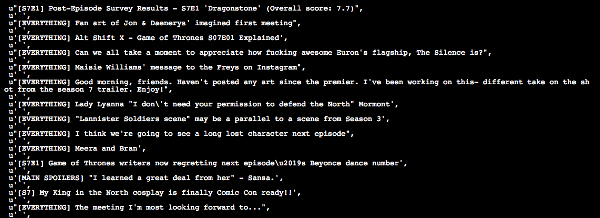
Here response.css(..) is a function that helps extract content based on css selector passed to it. The ‘.’ is used with the title because it’s a css Also, you need to use “::text” to tell your scraper to extract only the text content of the matching elements. This is done because scrapy directly returns the matching element along with the HTML code. Look at the following two examples:

Notice how “::text” helped us filter and extract only the text content.
Extracting vote counts for each post
Now this one is tricky. On inspecting, you get three scores:

The “score” class is applied to all three, so it can’t be used as a unique selector is required. On further inspection, it can be seen that the selector that uniquely matches the vote count that we need is the one that contains both “score” and “unvoted.”
When more than two selectors are required to identify an element, we use them both. Also, since both are CSS classes, we have to use “.” with their names. Let’s try it out first by extracting the first element that matches:
response.css(".score.unvoted").extract_first()

See that the number of votes for the first post is correctly displayed. Note that on Reddit, the votes score is dynamic based on the number of upvotes and downvotes, so it’ll be changing in real-time. We will add “::text” to our selector so that we only get the vote value and not the complete vote element. To fetch all the votes:
response.css(".score.unvoted::text").extract()Note: Scrapy has two functions to extract the content extract() and extract_first().
Dealing with relative time stamps: extracting time of post creation
On inspecting the post, it is clear that the “time” element contains the time of the post.

There is a catch here, though this is only the relative time(16 hours ago, etc.) of the post. This doesn’t give any information about the date or time zone the time is in. If we want to do some analytics, we won’t know by which date we have to calculate “16 hours ago”. Let’s inspect the time element a little more:

The “title” attribute of time has both the date and the time in UTC. Let’s extract this instead:
response.css("time::attr(title)").extract()
The .attr(attributename) is used to get the value of the specified attribute of the matching element.
Extracting the number of comments
I leave this as a practice assignment for you. If you have any issues, you can post them here: https://discuss.analyticsvidhya.com/, and the community will help you out.
So far:
- response – An object that the scrapy crawler returns. This object contains all the information about the downloaded content.
- response.css(..) – Matches the element with the given CSS selectors.
- extract_first(..) – Extracts the “first” element that matches the given criteria.
- extract(..) – Extracts “all” the elements that match the given criteria.
Note: CSS selectors are a very important concept as far as web scraping is concerned. You can read more about it here and how to use CSS selectors with scrapy.
Writing Custom Spiders Using Scrapy
As mentioned above, a spider is a program that downloads content from websites or a given URL. When extracting data on a larger scale, you would need to write custom spiders for different websites since there is no “one size fits all” approach in web scraping owing to the diversity in website designs. You also would need to write code to convert the extracted data to a structured format and store it in a reusable format like CSV, JSON (JavaScript Object Notation), excel, etc. That’s a lot of code to write. Luckily, scrapy comes with most of these functionalities built in.
Creating a Scrapy Project
Let’s exit the scrapy shell first and create a new scrapy project:
scrapy startproject ourfirstscraperThis will create a folder, “ourfirstscraper” with the following structure:

For now, the two most important files are:
- settings.py – This file contains the settings you set for your project. You’ll be dealing a lot with it.
- spiders/ – This folder will store all your custom spiders. Every time you ask scrapy to run a spider, it will look for it in this folder.
Creating a Spider
Let’s change the directory into our first scraper and create a basic spider “redditbot”:
scrapy genspider redditbot www.reddit.com/r/gameofthrones/This will create a new spider, “redditbot.py” in your spiders/ folder with a basic template:

Few things to note here:
- name: Name of the spider, in this case, it is “redditbot”. Naming spiders properly becomes a huge relief when you have to maintain hundreds of spiders.
- allowed_domains: An optional list of strings containing domains that this spider is allowed to crawl. Requests for URLs not belonging to the domain names specified in this list won’t be followed.
- parse(self, response): This parse function is called whenever the crawler successfully crawls a URL. Remember the response object from earlier? This is the same response object that is passed to the parse(..).
After every successful crawl, the parse(..) method is called, and so that’s where you write your extraction logic. Let’s add the logic written earlier to extract titles, time, votes, etc., in the parse method:
def parse(self, response):
        #Extracting the content using css selectors
        titles = response.css('.title.may-blank::text').extract()
        votes = response.css('.score.unvoted::text').extract()
        times = response.css('time::attr(title)').extract()
        comments = response.css('.comments::text').extract()

        #Give the extracted content row wise
        for item in zip(titles,votes,times,comments):
            #create a dictionary to store the scraped info
            scraped_info = {
                'title' : item[0],
                'vote' : item[1],
                'created_at' : item[2],
                'comments' : item[3],
            }

            #yield or give the scraped info to scrapy
            yield scraped_info
Note: Here, yield scraped_info does all the magic. This line returns the scraped info(the dictionary of votes, titles, etc.) to scrapy, which in turn processes it and stores it.
Save the file redditbot.py and head back to the shell. Run the spider with the following command:
scrapy crawl redditbotScrapy would print a lot of stuff on the command line. Let’s focus on the data.

Notice that all the data is downloaded and extracted in a dictionary-like object that meticulously has the votes, title, created_at, and comments.
Exporting scraped data as a CSV file
Getting all the data on the command line is nice, but as a data scientist, it is preferable to have data in certain formats like CSV, Excel, JSON, etc., that can be imported into programs. Scrapy provides this nifty little functionality where you can export the downloaded content in various formats. Many of the popular formats are already supported.
Open the settings.py file and add the following code to it:
#Export as CSV Feed
FEED_FORMAT = "csv"
FEED_URI = "reddit.csv"
And run the spider:
scrapy crawl redditbotThis will now export all scraped data into a file called reddit.csv. Let’s see how the CSV looks:

What happened here:
- FEED_FORMAT: The format in which you want the data to be exported. Supported formats are: JSON, JSON lines, XML and CSV.
- FEED_URI: The location of the exported file.
There are a plethora of forms that scrapy supports for exporting feed. If you want to dig deeper, you can check here and use css selectors in scrapy.
Now that you have successfully created a system that crawls web content from a link, scrapes(extracts) selective data from it, and saves it in an appropriately structured format, let’s take the game a notch higher and learn more about web scraping.
Case Studies Using Scrapy
Let’s now look at a few case studies to get more experience with scrapy as a tool and its various functionalities.
Scraping an E-Commerce Site
The advent of the internet and smartphones has been an impetus to the e-commerce industry. With millions of customers and billions of dollars at stake, the market has started seeing a multitude of players. This, in turn, has led to rising of e-commerce aggregator platforms that collect and show you information regarding your products from across multiple portals. For example, when planning to buy a smartphone, you would want to see the prices on different platforms in a single place. What does it take to build such an aggregator platform? Here’s my small take on building an e-commerce site scraper.
As a test site, you will scrape ShopClues for 4G-Smartphones
Let’s first generate a basic spider:
scrapy genspider shopclues www.shopclues.com/mobiles-featured-store-4g-smartphone.htmlThis is what the ShopClues web page looks like:

The following information needs to be extracted from the page:
- Product Name
- Product price
- Product discount
- Product image
Extracting image URLs of the product
On careful inspection, it can be seen that the attribute “data-img” of the <img> tag can be used to extract image URLs:
response.css("img::attr(data-img)").extract()
Extracting product name from <img> tags
Notice that the “title” attribute of the <img> tag contains the product’s full name:

response.css("img::attr(title)").extract()Similarly, selectors for price(“.p_price”) and discount(“.prd_discount”).
How to download product images?
Scrapy provides reusable image pipelines for downloading files attached to a particular item (for example, when you scrape products and also want to download their images locally).
The Images Pipeline has a few extra functions for processing images. It can:
- Convert all downloaded images to a common format (JPG) and mode (RGB)
- Thumbnail generation
- Check the image’s width/height to make sure they meet a minimum constraint
In order to use the images pipeline to download images, it needs to be enabled in the settings.py file. Add the following lines to the file:
ITEM_PIPELINES = {
  'scrapy.pipelines.images.ImagesPipeline': 1
}
IMAGES_STORE = 'tmp/images/'
you are basically telling scrapy to use the ‘Images Pipeline,’ and the location for the images should be in the folder ‘tmp/images/.’ The final spider would now be:
import scrapy

class ShopcluesSpider(scrapy.Spider):
   #name of spider
   name = 'shopclues'

   #list of allowed domains
   allowed_domains = ['www.shopclues.com/mobiles-featured-store-4g-smartphone.html']
   #starting url
   start_urls = ['http://www.shopclues.com/mobiles-featured-store-4g-smartphone.html/']
   #location of csv file
   custom_settings = {
       'FEED_URI' : 'tmp/shopclues.csv'
   }

   def parse(self, response):
       #Extract product information
       titles = response.css('img::attr(title)').extract()
       images = response.css('img::attr(data-img)').extract()
       prices = response.css('.p_price::text').extract()
       discounts = response.css('.prd_discount::text').extract()

       for item in zip(titles,prices,images,discounts):
           scraped_info = {
               'title' : item[0],
               'price' : item[1],
               'image_urls' : [item[2])], #Set's the url for scrapy to download images
               'discount' : item[3]
           }

           yield scraped_info
Here are a few things to note:
- custom_settings: This is used to set the settings of an individual spider. Remember that settings.py is for the whole project, so here you tell scrapy that the output of this spider should be stored in a CSV file “shopclues.csv” that is to be stored in the “tmp” folder.
- scraped_info[“image_urls”]: This is the field that scrapy checks for the image’s link. If you set this field with a list of URLs, scrapy will automatically download and store those images for you.
On running the spider, the output can be read from “tmp/shopclues.csv”:

You also get the images downloaded. Check the folder “tmp/images/full,” and you will see the images:

Also, notice that scrapy automatically adds the download path of the image on your system in the csv:

There you have your own little e-commerce aggregator.
If you want to dig in, you can read more about Scrapy’s Images Pipeline here.
Scraping Techcrunch: Creating Your Own RSS Feed Reader

Techcrunch is one of my favorite blogs that I follow to stay abreast with news about startups and the latest technology products. Just like many blogs nowadays, TechCrunch gives its own RSS feed here: https://techcrunch.com/feed/. One of Scrapy’s features is its ability to handle XML data with ease, and in this part, you are going to extract data from Techcrunch’s RSS feed.
Create a basic spider:
Scrapy genspider techcrunch techcrunch.com/feed/Let’s have a look at the XML; the marked portion is data of interest:

Here are some observations from the page:
- Each article is present between <item></item> tags, and there are 20 such items(articles).
- The title of the post is in <title></title> tags.
- The link to the article can be found in <link> tags.
- <pubDate> contains the date of publishing.
- The author’s name is enclosed between funny-looking <dc:creator> tags.
Overview of XPath and XML
XPath is a syntax that is used to define XML documents. It can be used to traverse through an XML document. Note that XPath follows a hierarchy.
Extracting the title of the post
Let’s extract the title of the first post. Similar to response.css(..), the function response.xpath(..) in scrapy deals with XPath. The following code should do it:
response.xpath("//item/title").extract_first()Output:
u'<title xmlns:content="http://purl.org/rss/1.0/modules/content/" xmlns:wfw="http://wellformedweb.org/CommentAPI/" xmlns:dc
="http://purl.org/dc/elements/1.1/" xmlns:atom="http://www.w3.org/2005/Atom" xmlns:sy="http://purl.org/rss/1.0/modules/syndication/"
xmlns:slash="http://purl.org/rss/1.0/modules/slash/" xmlns:georss="http://www.georss.org/georss" xmlns:geo="http://www.w3.org/2003/
01/geo/wgs84_pos#" xmlns:media="http://search.yahoo.com/mrss/">Why the future of deep learning depends on finding good data</title>'
Wow! That’s a lot of content, but only the text content of the title is of interest. Let’s filter it out:
response.xpath("//item/title/text()").extract_first()Output:
u'Why the future of deep learning depends on finding good data'This is much better. Notice that text() here is equivalent of ::text from CSS selectors. Also, look at the XPath //item/title/text(); here, you are basically saying to find the element “item” and extract the “text” content of its sub-element “title”.
Similarly, the Xpaths for the link, pubDate as:
- Link – //item/link/text()
- Date of publishing – //item/pubDate/text()
Extracting author name: dealing with namespaces in XML
Notice the <creator> tags:

The tag itself has some text “dc:” because of which it can’t be extracted using XPath, and the author name itself is crowded with “![CDATA..” irrelevant text. These are just XML namespaces, and you don’t want to have anything to do with them, so we’ll ask scrapy to remove the namespace:
response.selector.remove_namespaces()Now when you try extracting the author name, it will work:
response.xpath("//item/creator/text()").extract_first()Output: u’Ophir Tanz,Cambron Carter’
The complete spider for TechCrunch would be:
import scrapy

class TechcrunchSpider(scrapy.Spider):
    #name of the spider
    name = 'techcrunch'

    #list of allowed domains
    allowed_domains = ['techcrunch.com/feed/']

    #starting url for scraping
    start_urls = ['http://techcrunch.com/feed/']

    #setting the location of the output csv file
    custom_settings = {
        'FEED_URI' : 'tmp/techcrunch.csv'
    }

    def parse(self, response):
        #Remove XML namespaces
        response.selector.remove_namespaces()

        #Extract article information
        titles = response.xpath('//item/title/text()').extract()
        authors = response.xpath('//item/creator/text()').extract()
        dates = response.xpath('//item/pubDate/text()').extract()
        links = response.xpath('//item/link/text()').extract()

        for item in zip(titles,authors,dates,links):
            scraped_info = {
                'title' : item[0],
                'author' : item[1],
                'publish_date' : item[2],
                'link' : item[3]
            }

            yield scraped_info
Let’s run the spider:
scrapy crawl techcrunch
And there you have your own RSS reader!
Conclusion
In this article, we have just scratched the surface of Scrapy’s potential as a web scraping tool. Nevertheless, if you have experience with any other tools for scraping, it would have been evident by now the efficiency and practical application, Scrapy wins hands down. All the code used in this scrapy tutorial is available on GitHub. Also, check out some of the interesting projects built with Scrapy:
- Scraping the STEAM Game Store with Scrapy
- Internet Archaeology: Scraping time series data from Archive.org
- Filtering Startup News with Machine Learning and Scrapy
- Advanced Web Scraping: Bypassing “403 Forbidden,” captchas, and more
Also, there are multiple libraries for web scraping. BeautifulSoup, Selenium is one of those libraries. To learn more, you go through our free course- Introduction to Web Scraping using Python.
Key Takeaways
- Scrapy is widely used for web scraping.
- Scrapy library is a better web scraping library as compared to other web scraping libraries.
- Scrapy uses spiders to scrape data from websites.
Frequently Asked Questions
Q1. What are the advantages of Scrapy over other web scraping libraries?
A. Some of the advantages of the scrapy are:
1. It provides high-level API, which makes it easy to build and maintain projects.
2. Scrapy can handle websites with a large number of pages and complex structures. It handles pagination, thus allowing users to traverse to the next pages or previous pages easily.
3. Scrapy is fast and efficient.
4. Scrapy is highly extensible and can be customized to meet our needs. we can add custom middleware, pipelines, and extensions to enhance the functionality of the framework.
5. Scrapy supports multiple data storage formats like csv files,json files, etc.
Q2. What is Scrapy?
A. Scrapy is a Python open-source web crawling framework used for large-scale web scraping. It is a web crawler used for both web scraping and web crawling. It gives you all the tools you need to efficiently extract data from websites, process them as you want, and store them in your preferred structure and format.
Q3. What is the difference between web scraping and web crawling?
A. The key difference between these two is that using web scraping, we aim at extracting specific data from a webpage, whereas web crawling is a broad exploration of the web.






By far the simplest and the best explaination about scrapy. Thanks !!
Thanks for your comment, Mayank! :)
How would I use the save scrapy items and integrate it in my project so it will display the items on the website page?
Hi Mohammed, A very detailed article on scraping. Could you please let me know how does scrapy differs from Beautifulsoup?
Hey Karthikeyan, BeautifulSoup is a library that "parses" HTML or XML content. In other words, it reads your HTML file and helps extract content from it. Scrapy is a full blown web scraping framework. That means, it already has the functionality that BeautifulSoup provides along with that it offers much more. When you are developing a web scraping system, you would need a way to send requests to the websites (probably using requests or urllib) , you would need a way to send multiple requests at once(multiprocessing/asynchronous) so that you can download content faster. You would also need a way to export your downloaded content in various required formats, if you are working on large scale projects, you would require deploying your scraping code across distributed systems. Scrapy provides you with all of that and much more in built. And yeah, you can use BeautifulSoup with Scrapy if you prefer. Hope this helps, Sanad :)
Hi Sanad, I am currently started using scrapy but two roadblocks I have first in our domain we need to crawl pdf pages which scrapy doesn't provide and after googling I found couple of paid ways which we don't prefer, second how we write junit for any scrapy code to do unit testing is there any framework for this? Please help me out on this. Thanks Ankit
Hey Ankit, 1. I'm not sure what do you mean by crawling PDF pages? If you are trying to scrape websites for PDF files, it again depends on what you are trying to achieve. You can probably use Scrapy to extract link of target PDFs and urllib2 or requests to fetch the PDF files. And then you can use something like PDFMiner( https://pypi.python.org/pypi/pdfminer/) to parse PDF and extract information. 2. Regarding writing unit tests for Scrapy code, it provides an integrated way to unit test spiders, check out Spiders Contracts : https://doc.scrapy.org/en/latest/topics/contracts.html